Contents
- The Next-Gen Underwriter: Accelerating Quotes with Document Intelligence
- A Multi-Agent Framework for Instant Data Extraction and Premium Calculation with Google ADK
- The Framework: Google Agent Development Kit (ADK)
- The Architecture: A More Realistic Quoting Pipeline
- Step 1: The Ingestion Agent
- Step 2: The Extraction and Quoting Agents
- Step 3: Orchestrating the Pipeline
- Putting It All Together: A Runnable Application
- Execution Output
- From Local Test to Production Service
- Conclusion: Augmenting, Not Replacing, the Expert
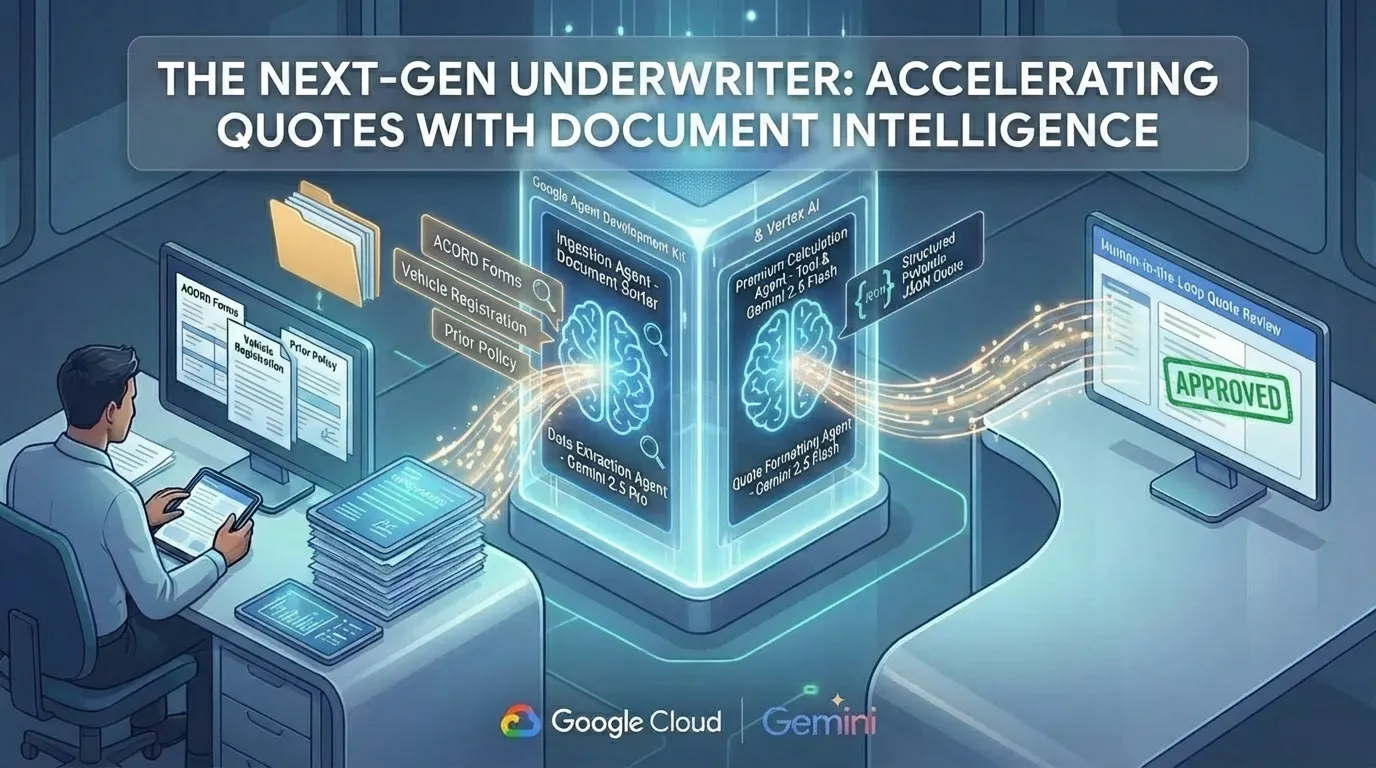
Accelerating Quotes with Document Intelligence (Image by Author).
The Next-Gen Underwriter: Accelerating Quotes with Document Intelligence
 Please Note Please Note |
|
A Multi-Agent Framework for Instant Data Extraction and Premium Calculation with Google ADK
In the hyper-competitive insurance market, speed is the ultimate currency. The carrier that delivers an accurate quote first often wins the business. Yet, for decades, the underwriting process has been anchored by a manual, time-intensive task: extracting data from a mountain of disparate documents. Underwriters, who should be focused on strategic risk assessment, are instead mired in the operational quicksand of data entry, toggling between ACORD forms, prior carrier policies, and vehicle registration PDFs.
This manual data entry introduces significant latency into the quoting pipeline. In a market where response time directly correlates with conversion rates, this latency translates to lost business. The objective is to re-architect this pipeline, replacing human data-transfer steps with a deterministic, automated system.
This article details how to build a GenAI-powered agent system that automates the quoting pipeline. Using the Google Agent Development Kit (ADK), Gemini 2.5, and principles of multi-agent design, we will construct a system that can instantly classify complex policy documents, extract key data points, and generate a comparable quote in seconds. This is how we shift the underwriter’s role from data processor to strategic analyst.
The Framework: Google Agent Development Kit (ADK)
To build a system this complex, we need more than a simple LLM API call. We require a framework that supports stateful, auditable, and production-ready workflows. The Google ADK is designed for this purpose. It provides the core primitives to build sophisticated agentic systems:
- Agents: Specialized, intelligent units that perform specific tasks. We will use LlmAgent for complex reasoning and SequentialAgent to orchestrate the workflow deterministically.
- State Management: The ADK provides a Session object with a shared state dictionary. This allows different agents to communicate and pass data — like a customer’s VIN or their prior coverage limits — seamlessly through the pipeline.
- Tools: Agents can be given capabilities beyond text generation. As we’ll see, agents can use tools — which are simple Python functions — to interact with external data sources or logic, like a pricing engine.
- Structured Output: ADK’s integration with Pydantic allows us to force an LLM to output clean, validated JSON. This is the key to creating reliable, actionable data for downstream processes.
The Architecture: A More Realistic Quoting Pipeline
Our goal is to automate the cognitive sequence a human underwriter follows. For our improved example, this process now includes reading from a directory of document files and using a dedicated tool to calculate the premium. The agent flow is as follows:
- The Document Ingestion Agent: Reads a directory of application documents (e.g., ACORD forms, vehicle registrations) from the file system.
- The Data Extraction Agent: Parses the content of all documents to extract key data points into a structured format.
- The Premium Calculation Agent: Uses a calculate_premium_tool to determine the policy price based on the extracted data.
- The Quote Formatting Agent: Assembles the final quote from all the data gathered in the previous steps.

Figure 1: System Architecture (Image by Author).
Step 1: The Ingestion Agent
First, we create text files to simulate the underwriting documents. Then, our DocumentIngestionAgent reads all files from a ./documents directory and loads their content into the session state. This is more realistic than hardcoding the text in the agent itself.
# In agent.py
import os
import asyncio
import json
from pydantic import BaseModel, Field
from typing import AsyncGenerator, Literal
from google.adk.agents import Agent, SequentialAgent, BaseAgent
from google.adk.agents.invocation_context import InvocationContext
from google.adk.events import Event
from google.genai import types as genai_types
class DocumentIngestionAgent(BaseAgent):
    """Reads all documents from the specified directory into the session state."""
    async def _run_async_impl(self, ctx: InvocationContext) -> AsyncGenerator[Event, None]:
        doc_path = os.path.join(os.path.dirname(__file__), "documents")
        docs = []
        for filename in os.listdir(doc_path):
            file_path = os.path.join(doc_path, filename)
            if os.path.isfile(file_path):
                with open(file_path, 'r') as f:
                    content = f.read()
                    docs.append({"doc_type": filename, "content": content})

        ctx.session.state["documents"] = docs
        yield Event(author=self.name, content=genai_types.Content(parts=[genai_types.Part(text=f"Ingested and classified {len(docs)} documents.")]))
ingestion_agent = DocumentIngestionAgent(name="DocumentSorter")
Step 2: The Extraction and Quoting Agents
With the documents in the session state, the DataExtractor agent can parse them. The key change is in the quoting logic. We now have a dedicated calculate_premium_tool that acts as a mini rating engine. A QuoteCalculator agent is responsible for calling this tool, and a final QuoteFormatter agent assembles all the pieces into the structured output. This separation of concerns (tool use vs. formatting) is a critical ADK pattern.
# Continuing in agent.py...
# --- Tool Definition ---
def calculate_premium_tool(
    vehicle_model: str, prior_bodily_injury_coverage: str
) -> dict:
    """Calculates a monthly premium based on vehicle and prior coverage."""
    base_premium = 150.0
    if "Tesla" in vehicle_model or "Rivian" in vehicle_model:
        base_premium += 25.0
    if "$300k" in prior_bodily_injury_coverage or "$500k" in prior_bodily_injury_coverage:
        base_premium -= 10.0 # Discount for higher prior limits
    return {"monthly_premium": base_premium}
# --- Pydantic Schemas ---
class ExtractedQuoteData(BaseModel):
    """Data structure for underwriting quote generation."""
    applicant_name: str = Field(description="The full name of the applicant.")
    vin: str = Field(description="The Vehicle Identification Number.")
    vehicle_model: str = Field(description="The make and model of the vehicle.")
    prior_bodily_injury_coverage: str = Field(description="Prior policy's bodily injury coverage, e.g., '$100k/$300k'.")
    prior_property_damage_coverage: str = Field(description="Prior policy's property damage coverage, e.g., '$50k'.")
class Quote(BaseModel):
    """Final quote structure."""
    applicant_name: str
    vin: str
    proposed_coverage: str
    monthly_premium: float
# --- Agent Definitions ---
data_extractor = Agent(
    name="DataExtractor",
    model="gemini-2.5-pro",
    instruction="""You are a specialized data extraction agent... Your output MUST be a single, raw JSON object that validates against the schema.""", # Instruction omitted for brevity
    output_schema=ExtractedQuoteData,
    output_key="extracted_data"
)
quote_calculator = Agent(
    name="QuoteCalculator",
    model="gemini-2.5-flash",
    tools=[calculate_premium_tool],
    instruction="""
    You are a premium calculation agent.
    Use the `calculate_premium_tool` to determine the monthly premium based on the vehicle model and prior coverage from the `{extracted_data}`.
    The tool will return a dictionary like {"monthly_premium": 165.0}. Your output should be ONLY the numeric value, like 165.0.
    """,
    output_key="monthly_premium"
)
quote_formatter = Agent(
    name="QuoteFormatter",
    model="gemini-2.5-flash",
    instruction="""
    You are a formatting agent.
    Take the `{extracted_data}` and the calculated `{monthly_premium}` from the session state.
    Format the final output into the `Quote` schema. The proposed coverage should match the prior policy's coverage levels.
    """,
    output_schema=Quote,
    output_key="final_quote"
)
Step 3: Orchestrating the Pipeline
Finally, we update our SequentialAgent to include all four agents in the correct order.
# The final piece of agent.py
underwriting_pipeline = SequentialAgent(
    name="UnderwritingPipeline",
    description="A multi-agent pipeline to automate insurance quoting.",
    sub_agents=[        ingestion_agent,
        data_extractor,
        quote_calculator,
        quote_formatter
    ],
)
root_agent = underwriting_pipeline
Example Input Documents
To make the example runnable, here is the content for the three sample documents that our agent will read. In a real workflow, an underwriter receives a bundle of such documents, each serving a distinct purpose. These files should be placed in the underwriting_app/documents/ directory.
acord_125.json
This represents a snippet from an ACORD 125 form, the standard commercial insurance application. For an underwriter, this is the foundational document containing the applicant’s basic information and insurance history. Our agent will use it to identify the applicant’s name and prior carrier details.
{
    "ACORD": {
        "form_id": "ACORD 125",
        "sections": [            {
                "section_name": "APPLICANT INFORMATION",
                "fields": {
                    "APPLICANT": "John 'Johnny' Doe",
                    "ADDRESS": "123 Main St, Anytown, USA 12345",
                    "PHONE": "555-123-4567"
                }
            },
            {
                "section_name": "PRIOR CARRIER",
                "fields": {
                    "CARRIER_NAME": "XYZ Insurance Co.",
                    "POLICY_NO": "ABC987654321",
                    "EXPIRATION_DATE": "2025-12-01"
                }
            }
        ]
    }
}
vehicle_registration.txt
This is a simplified vehicle registration document. It serves as official proof of the vehicle’s identity (make, model, year) and, crucially, its Vehicle Identification Number (VIN). An underwriter relies on this to confirm the exact vehicle being insured.
VEHICLE IDENTIFICATION REPORT
--------------------------------
VIN: 1A2B3C4D5E6F
MAKE: Tesla
MODEL: Model Y Long Range
YEAR: 2023
REGISTERED_OWNER: John Doe
ADDRESS: 123 Main St, Anytown, USA
prior_policy.txt
This file contains the declarations page from the applicant’s previous insurance policy. For an underwriter, this is a key document for competitive quoting. It reveals the applicant’s existing coverage limits, which our agent will use as a baseline to generate a comparable quote.
PRIOR POLICY DECLARATIONS - XYZ INSURANCE CO.
POLICY #: ABC987654321
NAMED INSURED: John Doe
COVERAGES:
- Bodily Injury Liability: $100,000 Each Person / $300,000 Each Accident
- Property Damage Liability: $50,000 Each Accident
- Uninsured Motorist: $100,000/$300,000
VEHICLE: 2023 Tesla Model Y - VIN: 1A2B3C4D5E6F
Putting It All Together: A Runnable Application
To run this full, realistic pipeline, follow these steps.
Create the Application Directory:
mkdir -p underwriting_app/documents
Create the Document Files: Create the three document files inside underwriting_app/documents/ with the content from the beginning of this section.
Create the agent.py file inside underwriting_app/ with all the code from the implementation steps above.
Create a Runner Script (run_pipeline.py): In the underwriting_app directory, create this file to execute the agent.
# underwriting_app/run_pipeline.py
import asyncio
import json
from google.adk.runners import Runner
from google.adk.sessions import InMemorySessionService
from google.genai import types as genai_types
from agent import root_agent # Import the root_agent from agent.py
async def main():
    """Runs the full underwriting pipeline programmatically."""
    session_service = InMemorySessionService()
    session_id = "quote-session-001"
    user_id = "underwriter_demo"
    app_name = "underwriting_app"
    await session_service.create_session(app_name=app_name, user_id=user_id, session_id=session_id)

    runner = Runner(agent=root_agent, app_name=app_name, session_service=session_service)
    print(f"Starting Underwriting Quote Pipeline...")
    async for event in runner.run_async(
        session_id=session_id,
        user_id=user_id,
        new_message=genai_types.Content(parts=[genai_types.Part(text="Start the quote generation process.")]),
    ):
        if event.content and event.content.parts and event.content.parts[0].text:
            print(f"[{event.author}]: {event.content.parts[0].text}")
    session = await session_service.get_session(app_name=app_name, session_id=session_id, user_id=user_id)
    final_quote = session.state.get("final_quote")
    print("\n--- QUOTE GENERATION COMPLETE ---")
    if final_quote:
        print(json.dumps(final_quote, indent=2))
if __name__ == "__main__":
    asyncio.run(main())
Run the Pipeline:
# Install dependencies
pip install google-adk==1.4.2 pydantic
# Run the pipeline from your project root
python underwriting_app/run_pipeline.py
Execution Output
Running the new, more realistic pipeline produces the following output. Note the discount applied by the calculate_premium_tool for the good prior coverage.
Starting Underwriting Quote Pipeline...
[DocumentSorter]: Ingested and classified 3 documents.
[DataExtractor]: {
"applicant_name": "John Doe",
"vin": "1A2B3C4D5E6F",
"vehicle_model": "Tesla Model Y Long Range",
"prior_bodily_injury_coverage": "$100,000 Each Person / $300,000 Each Accident",
"prior_property_damage_coverage": "$50,000 Each Accident"
}
Warning: there are non-text parts in the response: ['function_call'], returning concatenated text result from text parts. Check the full candidates.content.parts accessor to get the full model response.
[QuoteCalculator]: 165.0
[QuoteFormatter]: {
  "applicant_name": "John Doe",
  "vin": "1A2B3C4D5E6F",
  "proposed_coverage": "Bodily Injury: $100k/$300k, Property Damage: $50k",
  "monthly_premium": 165.0
}
--- QUOTE GENERATION COMPLETE ---
{
  "applicant_name": "John Doe",
  "vin": "1A2B3C4D5E6F",
  "proposed_coverage": "Bodily Injury: $100k/$300k, Property Damage: $50k",
  "monthly_premium": 165.0
}
From Local Test to Production Service
For production, this agent can be deployed as a secure, scalable API on Google Cloud Run. This serverless environment ensures that you only pay for what you use, and combined with Vertex AI’s security guarantees, it ensures that sensitive customer data remains within your cloud environment and is never used for model training.
Conclusion: Augmenting, Not Replacing, the Expert
The output of this pipeline is not designed to autonomously bind policies. It is designed to feed a “human-in-the-loop” UI. The underwriter is presented with the source documents and the AI-extracted data side-by-side, along with the generated quote. Their role shifts from data collector to data verifier and strategic decision-maker. They are now empowered to process more quotes, faster, and with greater accuracy.
By breaking down the complex cognitive workflow of underwriting into a series of specialized tasks for AI agents, we can achieve a profound increase in efficiency. We’ve used Gemini 2.5 Pro for the heavy-lifting of data extraction and the nimble Gemini 2.5 Flash for the final formatting — an “Economy of Intelligence” pattern that optimizes for both performance and cost.
This architecture moves the underwriter from the back office to the front lines of competitive advantage, armed with the speed and intelligence of GenAI.
To explore more multi-agent patterns, check out the Google Agent Development Kit (ADK) samples.
Contacts
If you want to keep updated with my latest articles and projects follow me on Medium and subscribe to my mailing list. These are some of my contacts details:
