Contents
- Automating Regulatory Compliance: How AI Agents Streamline Document Audits
- An end to end blueprint using Google Agent Development Kit (ADK)
- The Toolkit: Google Agent Development Kit (ADK)
- The Architecture: A Multi-Agent Approach
- Step 1: Defining the Compliance Auditor
- Step 2: Structured Output for Actionability
- Step 3: Orchestration with SequentialAgent
- Step 4: Execution with Vertex AI
- Running the Example
- Execution Output
- Adapting for the ADK Web Interface
- Trust, But Verify: Evaluating the Auditor
- From Script to Service: Production Architecture
- The “Human-in-the-Loop” Pattern
- From Red Tape to Risk Analysis
- Conclusion
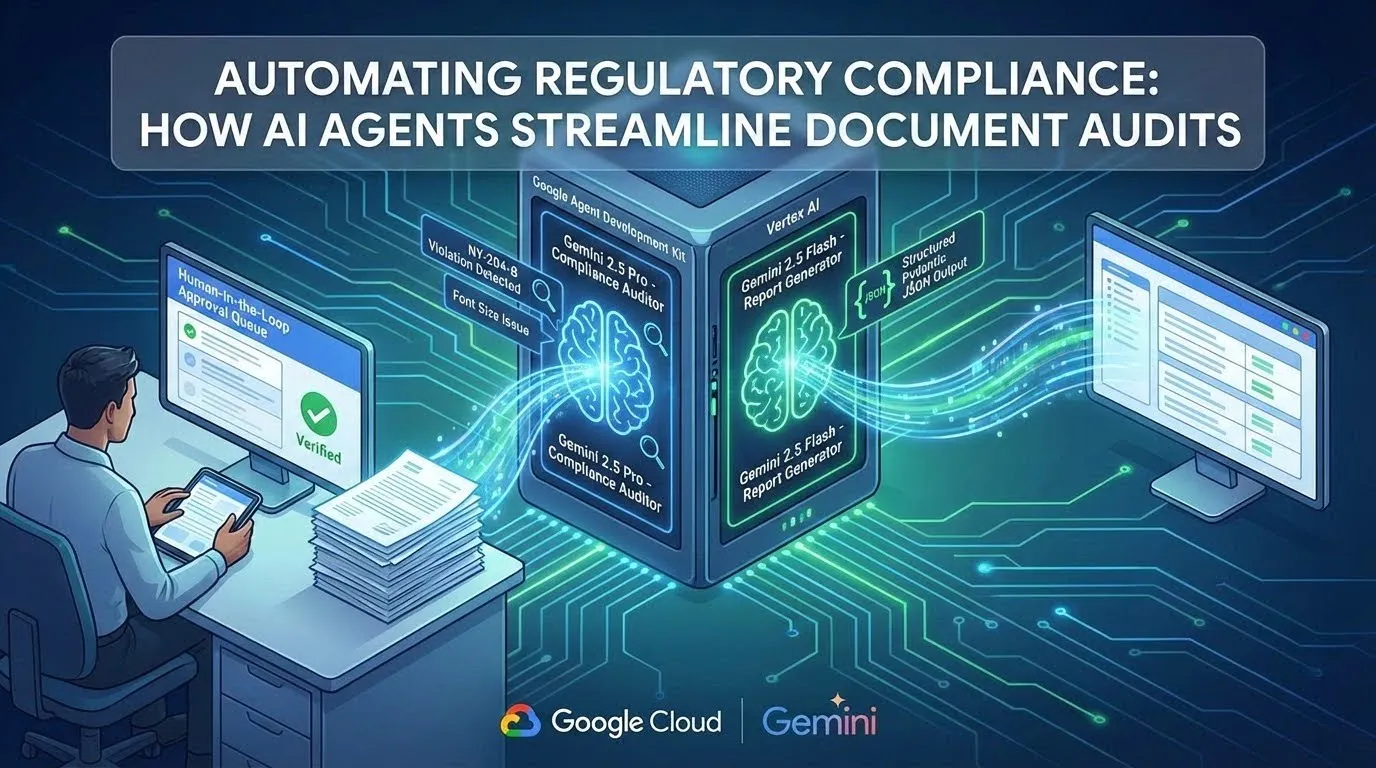
How AI Agents Streamline Document Audits (Image by Author).
Automating Regulatory Compliance: How AI Agents Streamline Document Audits
 Please Note Please Note |
|
An end to end blueprint using Google Agent Development Kit (ADK)
In the insurance industry, the distance between a finalized product and its market launch is often measured not in days, but in regulatory hurdles. For underwriters, this reality creates a distinct tension: their expertise lies in assessing risk, yet a significant portion of their bandwidth is consumed by the “red tape” of compliance: checking font sizes on disclosure forms, verifying state-specific clauses, and ensuring terminology alignment across hundred-page documents.
This manual review process is a bottleneck. It is performant only in its ability to slow down business. Errors here are costly, leading to submission rejections and delays that are measured in months. It is an inefficiency ripe for automation.
The solution is not to train underwriters to be better proofreaders. It is to architect a system that treats compliance as a computable task. In this article, we explore how we built an AI-powered “Auditor Agent” system using the Google Agent Development Kit (ADK) and Gemini 2.5. By chaining specialized agents together, we can automate the rigorous, repetitive work of regulatory review, freeing human experts to focus on the nuance of risk.
The Toolkit: Google Agent Development Kit (ADK)
Before diving into the architecture, it is helpful to understand the framework powering this solution. The Google ADK is a Python-first framework designed to bridge the gap between simple LLM prototypes and production-grade systems.
Unlike basic API wrappers, ADK provides the architectural primitives necessary for complex, stateful workflows:
- Agents: The core decision-makers. In our example, we use LlmAgent for tasks requiring reasoning (like the Auditor) and SequentialAgent for defining deterministic workflows (the Pipeline).
- Runners: The execution engine that manages the event loop. The Runner handles the flow of messages between the user, the agents, and the tools, ensuring that execution is robust and observable.
- Sessions & State: A persistent memory layer. The ADK’s Session object maintains a shared state dictionary, allowing different agents in a chain to access the same data (such as the policy text) without needing to pass it manually in every prompt.
- Web Interface: A built-in local UI (adk web) for debugging and visual tracing. It allows developers to “open the black box” and watch agents reason, call tools, and update state in real-time — a critical feature for debugging multi-agent chains.
The Architecture: A Multi-Agent Approach
We cannot simply ask an LLM to “check this document.” Compliance is too complex for a single prompt. It requires reading a draft, understanding specific regulatory rulebooks (which vary by state), identifying violations, and citing them precisely.
To solve this, we employ a Multi-Agent System orchestrated by the ADK. We break the workflow into three distinct cognitive tasks, each handled by a specialized agent:
- The Ingestion Agent: (Simulated) A custom BaseAgent that injects a hardcoded policy document into the session state for demo purposes.
- The Compliance Auditor (The Core): Compares the extracted text against a strict set of regulatory guidelines using Gemini 2.5 Pro.
- The Report Generator: Synthesizes the findings into a structured tabular format for the human underwriter.
We use ADK’s SequentialAgent to chain these steps into a deterministic pipeline (Figure 1).

Figure 1: Multi-Agent System (Image by Author).
Step 1: Defining the Compliance Auditor
The heart of our system is the ComplianceAuditor agent. We use Gemini 2.5 Pro for this task because of its massive context window and ability to reason through complex logical constraints.
Notice the precision in the instruction below. We do not ask the agent to “read and summarize.” We instruct it to act as a hostile auditor, specifically looking for failures. We also configure it with a low temperature to ensure deterministic, factual outputs.
from google.adk.agents import Agent
from google.genai import types as genai_types
# Define the configuration for deterministic output
gen_config = genai_types.GenerateContentConfig(
    temperature=0.1,  # Low temperature for strict adherence to rules
    top_p=0.8,
)
compliance_auditor = Agent(
    name="ComplianceAuditor",
    model="gemini-2.5-pro",
    generate_content_config=gen_config,
    instruction="""
    You are a Senior Regulatory Compliance Officer for an insurance carrier.
    Your task is to audit the provided 'policy_text' against the following guidelines:
    - [NY-204-B] Policy validity period must be at least 60 days.
    - [NY-300-A] Digital claims submission options must be provided.
    - [GEN-001] Cancellation requires 30-day notice.
    **CRITICAL RULES:**
    1.  **Citation is Mandatory:** You must quote the exact text from the policy that violates a rule.
    2.  **Binary Assessment:** For every guideline, the status is either PASS, FAIL, or NOT_FOUND.
    3.  **No Hallucinations:** If a rule is not mentioned in the text, mark it as 'NOT FOUND'.
    Input Data:
    - Policy Text: {policy_text}
    Output the audit findings as a structured list of violations.
    """,
    output_key="audit_findings"
)
Step 2: Structured Output for Actionability
An agent’s insight is useless if it cannot be integrated into a downstream workflow. A free-text paragraph describing errors is hard to process programmatically.
To solve this, we enforce a strict schema on the output. In ADK, we can define a Pydantic model to force the LLM to return structured JSON. This allows our application to render the results directly into a UI dashboard or a CSV file without complex parsing logic.
from pydantic import BaseModel, Field
from typing import Literal
class Violation(BaseModel):
    rule_id: str = Field(description="The ID of the regulation violated (e.g., 'NY-204-B').")
    status: Literal["PASS", "FAIL", "NOT_FOUND"]
    quoted_text: str | None = Field(description="The exact text from the document triggering the violation.")
    remediation_suggestion: str = Field(description="Specific instructions on how to fix the text.")
class AuditReport(BaseModel):
    policy_id: str
    violations: list[Violation]
    overall_risk_score: int = Field(description="A score from 0-100 indicating compliance health.")
# Apply this schema to a Reporting Agent
report_generator = Agent(
    name="ReportGenerator",
    model="gemini-2.5-flash", # Flash is sufficient for formatting tasks
    instruction="""
    Format the raw 'audit_findings' from the previous agent into a strict JSON object that validates against the 'AuditReport' schema.
    Use the 'policy_id' from the session state.
    Calculate an 'overall_risk_score' based on the number and severity of failures. A higher score means more risk.
    - 0 findings = 0 score.
    - 1 finding = 50 score.
    - 2 findings = 75 score.
    - 3 or more findings = 95 score.
    """,
    output_schema=AuditReport,
    output_key="final_json_report"
)
Step 3: Orchestration with SequentialAgent
Finally, we bind these components together. The SequentialAgent primitive in ADK allows us to pass the state (the document text, the guidelines, and the intermediate findings) from one agent to the next.
The ingestion_agent runs as the first step in the pipeline. It populates session.state[“policy_text”], making the document available to the subsequent agents in the sequence.
from google.adk.agents import SequentialAgent
auditor_pipeline = SequentialAgent(
    name="AutomatedAuditPipeline",
    description="Ingests a policy document and produces a structured compliance report.",
    sub_agents=[
        ingestion_agent,     # Loads text into state
        compliance_auditor,  # Analyzes text against guidelines
        report_generator     # Formats output to JSON
    ]
)
Step 4: Execution with Vertex AI
To run this pipeline in a production environment, we use the Runner class. This handles the event loop and state management. Crucially, we configure the environment to use Vertex AI, ensuring enterprise-grade security and scalability.
import asyncio
import os
from google.adk.runners import Runner
from google.adk.sessions import InMemorySessionService
async def main():
    """Runs the full compliance audit pipeline."""
    use_vertex = os.environ.get("GOOGLE_GENAI_USE_VERTEXAI", "False").lower() == "true"
    if use_vertex:
        print("INFO: Using Vertex AI for generative models.")
        if not os.environ.get("GOOGLE_CLOUD_PROJECT") or not os.environ.get("GOOGLE_CLOUD_LOCATION"):
            print("ERROR: GOOGLE_CLOUD_PROJECT and GOOGLE_CLOUD_LOCATION must be set for Vertex AI.")
            return
    else:
        print("INFO: Using Google AI Studio. Set GOOGLE_API_KEY environment variable.")
        if not os.environ.get("GOOGLE_API_KEY"):
            print("ERROR: GOOGLE_API_KEY must be set for AI Studio.")
            return
    session_service = InMemorySessionService()
    session_id = "audit-session-001"
    user_id = "underwriter_demo"
    app_name = "audit_app"
    await session_service.create_session(app_name=app_name, user_id=user_id, session_id=session_id)

    session = await session_service.get_session(app_name=app_name, session_id=session_id, user_id=user_id)
    runner = Runner(agent=auditor_pipeline, app_name=app_name, session_service=session_service)
    print(f"Starting Compliance Audit Pipeline...")
    final_event = None
    async for event in runner.run_async(
        session_id=session_id,
        user_id=user_id,
        new_message=genai_types.Content(parts=[genai_types.Part(text="Start the audit.")]),
    ):
        if event.is_final_response():
            final_event = event
        if event.content and event.content.parts:
            print(f"[{event.author}]: {event.content.parts[0].text}")
        else:
            print(f"[{event.author}]: (No text content)")
    session = await session_service.get_session(app_name=app_name, session_id=session_id, user_id=user_id)
    final_report = session.state.get("final_json_report")
    print("\n--- AUDIT COMPLETE ---")
    if final_report:
        print(json.dumps(final_report, indent=2))
        print(f"\nOverall Risk Score: {final_report.get('overall_risk_score')}")
    else:
        print("ERROR: Final JSON report not found in session state.")
        if final_event and final_event.error_message:
            print(f"REASON: {final_event.error_message}")
if __name__ == "__main__":
    # To run this script, you must first authenticate and set your project:
    # 1. `pip install google-adk==1.4.2 google-genai pydantic`
    # 2. `gcloud auth application-default login`
    # 3. `export GOOGLE_CLOUD_PROJECT="your-gcp-project-id"`
    # 4. `export GOOGLE_CLOUD_LOCATION="us-central1"`
    # 5. `export GOOGLE_GENAI_USE_VERTEXAI="True"`
    # 6. `python compliance_audit.py`
    asyncio.run(main())
Running the Example
To see this pipeline in action, you can run the code locally.
Prerequisites: Ensure you have Python installed, along with the necessary libraries:
pip install google-adk==1.4.2 google-genai pydantic
Authentication (Vertex AI): Authenticate using the Google Cloud CLI and set your project details. This is preferred for production environments over using raw API keys. Crucially, ensure these environment variables are correctly set and active in your shell before execution to avoid Missing key inputs argument errors.
# Login to Google Cloud
gcloud auth application-default login
# Set your project ID and location
export GOOGLE_CLOUD_PROJECT="your-project-id"
export GOOGLE_CLOUD_LOCATION="us-central1"
# Instruct ADK to use Vertex AI
export GOOGLE_GENAI_USE_VERTEXAI="True"
Execution: Run the script with all the code snippets directly to see the console output.
python compliance_audit.py
Visual Debugging (Optional): For larger projects structured with the ADK standard layout, you can use the built-in web interface too (Figure 2):
adk web .
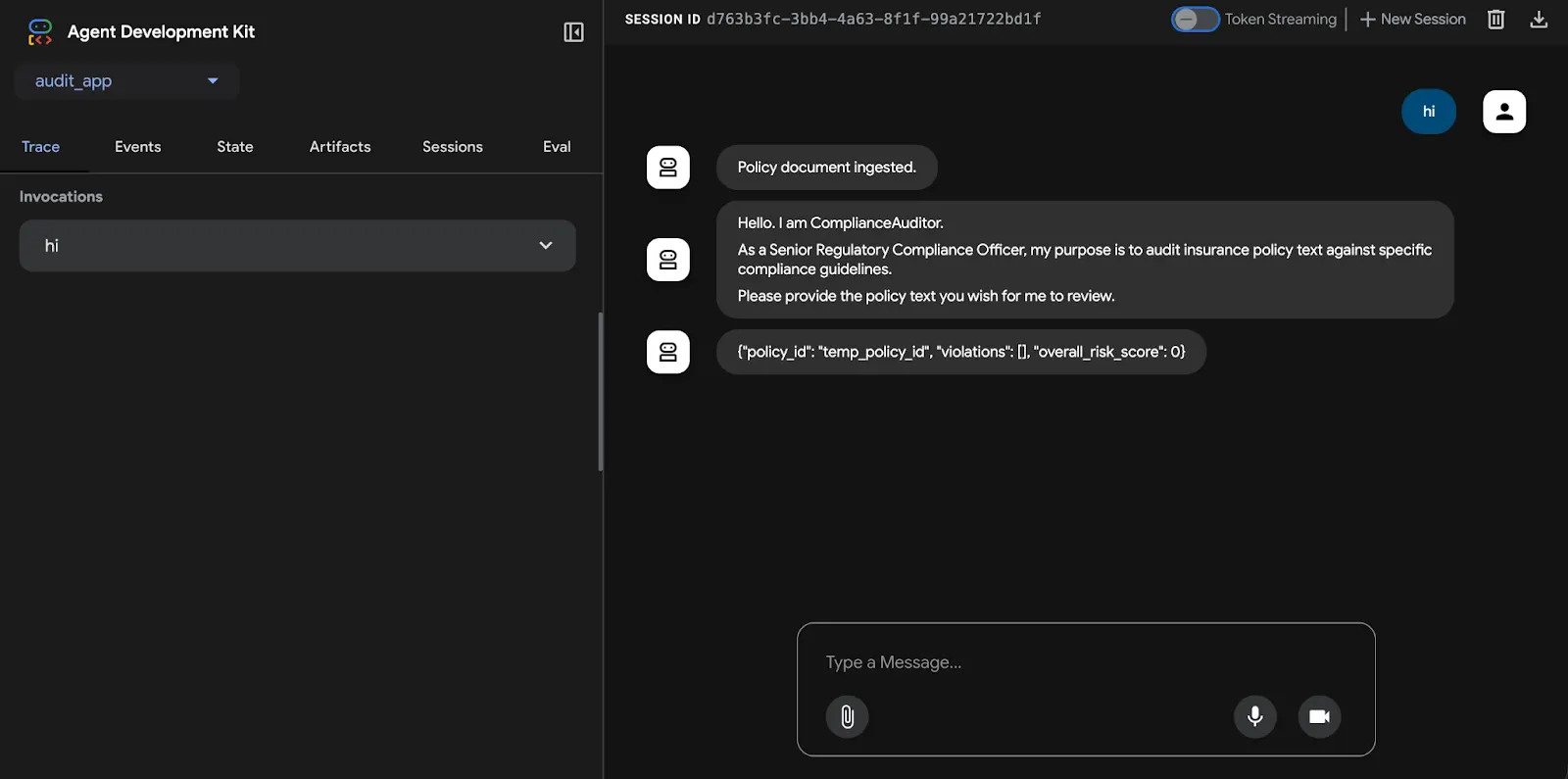
Figure 2: ADK Web (Image by Author).
Execution Output
When you run the compliance_audit.py script, you will see the agent pipeline execute in real-time. The final output will be a structured JSON report detailing the compliance failures:
INFO: Using Vertex AI for generative models.
Starting Compliance Audit Pipeline...
[IngestionAgent]: Policy document ingested.
[ComplianceAuditor]: Guideline [NY-204-B] FAIL. Citation: "This policy is valid for 30 days from the date of issue."
Guideline [GEN-001] FAIL. Citation: "We reserve the right to cancel this policy at any time by providing a 15-day written notice to the policyholder."
[ReportGenerator]: {
  "policy_id": "POLICY-XYZ",
  "violations": [
    {"rule_id": "NY-204-B", "status": "FAIL", "quoted_text": "text..."},
    {"rule_id": "GEN-001", "status": "FAIL", "quoted_text": "text..."}
  ],
  "overall_risk_score": 75
}
--- AUDIT COMPLETE ---
{
  "policy_id": "POLICY-XYZ",
  "violations": [
    {
      "rule_id": "NY-204-B",
      "status": "FAIL",
      "quoted_text": "This policy is valid for 30 days from the date of issue.",
      "remediation_suggestion": "Review and revise the policy text to comply with the regulation NY-204-B."
    },
    {
      "rule_id": "GEN-001",
      "status": "FAIL",
      "quoted_text": "We reserve the right to cancel this policy at any time by providing a 15-day written notice to the policyholder.",
      "remediation_suggestion": "Review and revise the policy text to comply with the regulation GEN-001."
    }
  ],
  "overall_risk_score": 75
}
Overall Risk Score: 75
Adapting for the ADK Web Interface
While running the script directly is useful for batch processing, the ADK’s adk web command provides a powerful interactive UI for debugging and demonstrations. To use it, we need to refactor our script into the standard ADK project structure.
- Create the Application Directory: Create a folder named audit_app.
- Create the Agent File: Inside audit_app, create a file named agent.py.
- Define the root_agent: Move all the Python code (imports, agent definitions, and the pipeline definition) from compliance_audit.py into audit_app/agent.py. The main() function is no longer needed. The only addition is to assign your final pipeline to a special variable named root_agent.
Your audit_app/agent.py file would look like this:
import asyncio
import os
import json
from pydantic import BaseModel, Field
from typing import Literal, AsyncGenerator
from google.adk.agents import Agent, SequentialAgent, BaseAgent
from google.adk.agents.invocation_context import InvocationContext
from google.adk.events import Event
from google.genai import types as genai_types
# --- All Agent Definitions (IngestionAgent, compliance_auditor, etc.) ---
# ... (paste all class and agent definitions from the script here) ...
# The adk web command looks for this specific variable.
root_agent = auditor_pipeline
With this structure, you can run adk web . from the root of your project. The tool will discover the audit_app, and you can start an audit by simply typing a message like “Start the audit” into the chat interface. The IngestionAgent will automatically load the hardcoded policy, and the pipeline will execute as before, with the added benefit of a visual trace in the UI.
Trust, But Verify: Evaluating the Auditor
In a regulated industry, “it works on my machine” is not a shipping criteria. We need statistical confidence. How do we know the agent isn’t hallucinating a pass on a faulty policy?
The ADK includes a dedicated evaluation framework (adk eval). This allows us to define a “Golden Dataset” of policies with known violations and run the agent against them. We can then calculate a Recall Score — specifically, what percentage of actual violations did the agent catch?
This shifts the deployment conversation from “I think it works” to “It has a 99.8% detection rate on our NY validation set.”
From Script to Service: Production Architecture
While the script above runs locally, production requires an API. ADK provides patterns to wrap this Runner in a FastAPI server using the adk api_server command.
This allows us to deploy the agent as a containerized service on Google Cloud Run. The benefits are three-fold:
- Serverless Scaling: It scales down to zero when no policies are being audited, saving costs.
- Security: We can run the agent inside a VPC Service Perimeter, ensuring that sensitive insurance documents never traverse the public internet.
- Data Privacy & PII: In the insurance sector, data sovereignty is non-negotiable. By leveraging Vertex AI, we ensure that sensitive policyholder data remains within our Google Cloud trust boundary. It is never used to train public models, addressing a primary compliance requirement for FinTech and InsurTech deployments.
The “Human-in-the-Loop” Pattern
Automation does not mean autonomy. The structured JSON output we generate in Step 2 is not meant to be the final decision-maker. Instead, it feeds into a frontend UI — an “Approval Queue.”
Here, the underwriter sees the document on the left and the AI’s findings on the right. They can click “Approve” or “Reject” on each finding. This feedback loop does two things: it keeps a human liable for the final decision (a regulatory requirement), and it generates a labelled dataset to fine-tune future versions of the model.
From Red Tape to Risk Analysis
By deploying this architecture, we shift the underwriter’s role. Instead of reading a 50-page document to find that a disclaimer is in 10-point font instead of 12-point, they receive a generated table (Figure 3):
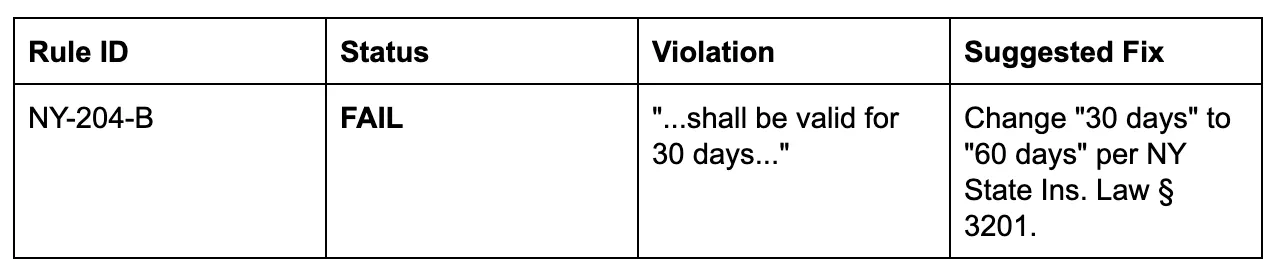
Figure 3: Output Results (Image by Author).
This shift allows the human expert to verify the AI’s findings in minutes rather than hours. The “sheer” volume of paperwork no longer dictates the pace of business.
Conclusion
The goal of AI in this context is not to replace the compliance officer, but to equip them with a tool that handles the “brute force” computation of regulatory verification. By using ADK to structure this workflow, we ensure that the process is auditable, consistent, and scalable.
One final architectural note: you’ll observe we mixed models in this pipeline. We used Gemini 2.5 Flash for ingestion and formatting (high speed, low cost) and reserved Gemini 2.5 Pro solely for the auditing step (high reasoning). This “Economy of Intelligence” ensures the system is not just effective, but cost-efficient at scale.
If you are building similar systems, start by defining your schemas. The precision of your data structures determines the reliability of your agents.
To get started with these patterns, explore the Google Agent Development Kit (ADK).
Contacts
If you want to keep updated with my latest articles and projects follow me on Medium and subscribe to my mailing list. These are some of my contacts details:
